LeadRoute vs LeadByte
Compare how you’d set up an order, check its cap and find out why a lead reached a buyer.
No credit card required.
Two active orders for the same buyer
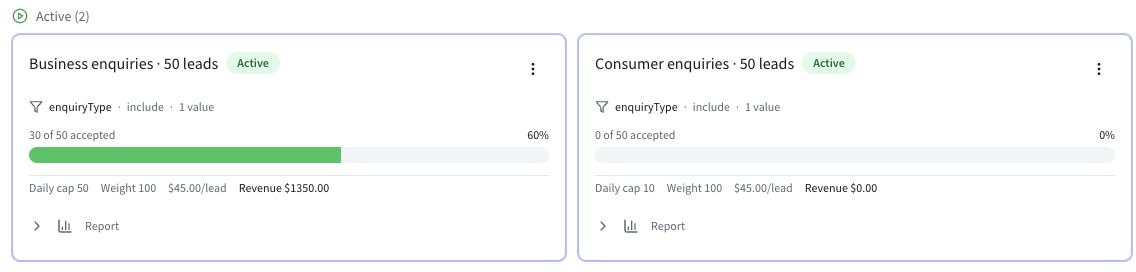
Compare the work you do every day
Use the same buyer, targeting criteria and repeat order in both demos.
| Workflow | LeadRoute | LeadByte |
|---|---|---|
| Buyer targeting | Keep several orders active for the same buyer, each with its own filters and cap. | LeadByte documents buyer and delivery caps, field rules and postcode ranges. |
| Repeat orders | Create a reorder from the existing order and queue it with a fresh cap. | Ask how the same targeting and cap carry over to a repeat batch. |
| Skipped delivery | See the buyers considered, order matches and receiver responses in the decision trace. | LeadByte shows reasons for skipped delivery, including rules, caps and schedules. |
| Connections | Use API or webhook intake and configure buyer endpoints. MCP is available as a pilot. | LeadByte lists API, SMS, email, batch CSV and FTP delivery. |
| Routing | Set up routes around buyer orders and inspect the outcome of each delivery. | LeadByte also documents ping-post auctions and several distribution strategies. |
Sources checked 13 November 2026.
When to choose LeadRoute
LeadRoute fits teams that want buyer orders, routes and delivery records in the same workflow. If your operation depends on auctions or scheduled FTP delivery, test those requirements in your LeadByte demo.
Try both platforms with the same order
Build an order, queue a reorder and inspect a delivery decision.
No credit card required.